

A Postback Diagnostic Guide
Your tracker and your network will never show identical numbers, and chasing perfect parity is the wrong goal. The two systems record conversions at different moments in the pipeline, apply different rules for what counts as “confirmed,” and handle duplicates, timezones, and holds differently by design. A gap under 5-10% is background noise you monitor and move on from. A gap past 15%, or one that’s growing week over week, means something in your postback chain is broken — and it’s almost always fixable in an afternoon once you know where to look.
Key Takeaways
- Tracker vs. network discrepancy comes from three structural sources: conversion status timing (hold vs. confirmed), attribution timestamp logic (click-time vs. event-time), and duplicate handling — not from either system being “wrong.”
- A 5-10% gap is normal across most trackers and networks; RedTrack and Voluum both put the alarm threshold around 15%, per their own team’s public comments.
- The single highest-frequency failure isn’t a missing postback — it’s a subid/click ID mismatch where the network never receives, or never returns, the exact token the tracker generated.
- Duplicate conversions inflate numbers in the opposite direction from missing ones, and both can be happening on the same campaign simultaneously, canceling each other out in your totals while still wrecking per-source attribution.
- Fix the structural stuff once (unique transaction IDs, status mapping, timezone alignment) and your weekly reconciliation time drops from hours to minutes.
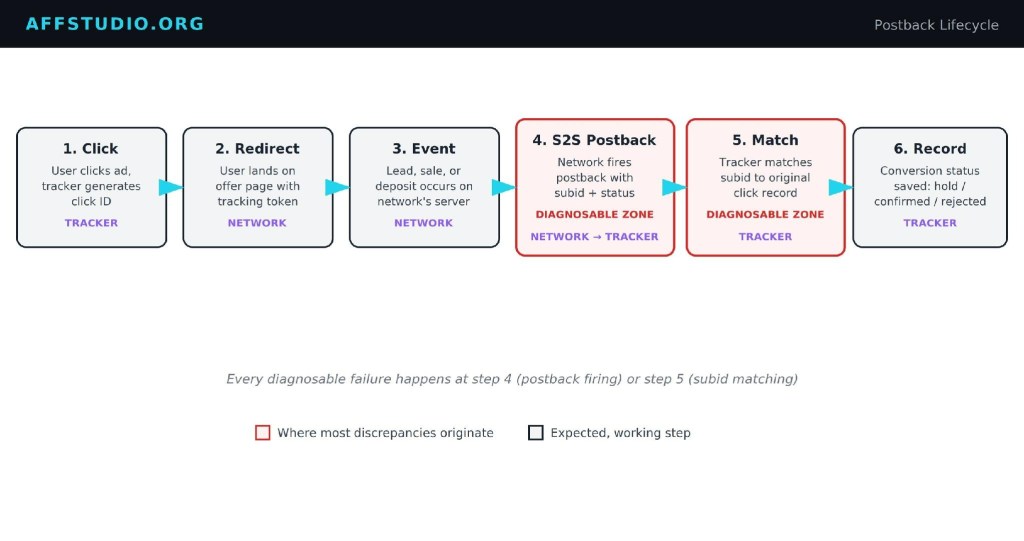
Figure 1. The postback lifecycle — every diagnosable failure happens at step 4 or 5.
Why Discrepancies Happen at All
Start with the part nobody argues about: your tracker and the CPA network are not looking at the same event. The network’s dashboard reflects what happened on its own servers — a lead submitted, a deposit processed, an advertiser’s fraud filter approving or rejecting it. Your tracker reflects what its postback listener received, whenever the network’s server got around to sending it. Those two things are related but not simultaneous, and the gap between them is where most of your “missing” conversions actually live.
The biggest single driver is status. Keitaro’s own conversion model splits this cleanly: a Lead status means payout isn’t confirmed yet and shows up under Revenue (hold); a Sale status means the payout is confirmed and lands in Revenue (confirmed); Rejected cancels the payout entirely. If you’re pulling your “conversions” number from the hold bucket and comparing it against the network’s confirmed-and-paid total, you’ll see a gap that has nothing to do with tracking accuracy — it’s the hold period doing exactly what it’s supposed to do. Most CPA networks apply that hold window specifically to screen for fraud, duplicate signups, and chargebacks before money changes hands, and gambling verticals in particular can run holds considerably longer than a standard e-commerce lead.

Figure 2. Same conversion, three possible endings — hold, confirmed, or rejected.
Attribution timing is the second driver, and it’s the one that trips up people who’ve been running trackers for years. Voluum’s own documentation walks through this with a plain example: a visit lands on the 16th, the conversion postback doesn’t arrive until the 18th. If your report window is filtered to “the 18th” and your tracker is set to visit-timestamp reporting (the default), that conversion won’t show up in that day’s numbers at all — it gets counted back on the 16th. Pull a same-day report from the network dashboard, which is almost always logging by event time, and you’re comparing two different calendars without realizing it.

Figure 3. Visit-time vs. postback-time reporting — same event, two different calendar days.
Then there’s the fact that “confirmed” doesn’t mean the same thing everywhere. One network’s postback might fire once, at the moment of signup, with no revision. Another fires on signup as pending, fires again on deposit as approved, and fires a third time if a chargeback flips it to declined. If your tracker’s status mapping only recognizes two of those three states, the third one either gets silently ignored or misfiled into the wrong bucket, and your revenue-confirmed number drifts from what actually clears the network’s books.
Attribution window length adds a fourth layer that’s easy to overlook because it rarely shows up as a dramatic gap — it shows up as a slow, chronic underreporting that’s hard to notice day to day. A network running a 30-day cookieless attribution window on a dating or CPA offer will still credit a conversion that happens three weeks after the click. If your tracker’s own default lookback window is shorter, or if you’re pulling reports on a rolling 7-day basis without accounting for late-arriving conversions from clicks outside that window, you’ll chronically undercount relative to the network — not because anything broke, but because the two systems are measuring different time horizons on the same funnel. This matters more in iGaming and dating verticals specifically, where the gap between first click and a qualifying action (a deposit, a paid subscription) tends to run longer than in most e-commerce CPA flows, so the attribution-window mismatch has more time to accumulate before you notice it in aggregate numbers.
None of this is a defect in either system. A tracker’s job is to log what it observed, when it observed it. A network’s job is to reconcile that against its own advertiser relationship, fraud tooling, and payout terms. They’re built to answer different questions, and a discrepancy is what you get any time you compare two answers to two different questions and expect them to match.
Common Failure Points
Everything above is expected behavior. What follows is where things actually break.
| Failure Point | What Happens | How It Shows Up |
|---|---|---|
| Postback never fires | Network’s server-side event never reaches the tracker — wrong URL, network-side filter, offer-level postback toggle left off | Tracker shows far fewer conversions than network; gap is roughly constant across days |
| Postback fires twice | No unique transaction ID passed, so a status update (pending → approved) registers as a second, separate conversion | Tracker shows more conversions than network, usually clustered around specific offers with multi-stage payout logic |
| Timezone/timestamp mismatch | Network logs in UTC or its own server timezone, tracker reports on account timezone or visit-time by default | Daily totals disagree even when weekly or monthly totals roughly align — a same-day comparison problem, not a real loss |
| Sub ID / click ID mapping error | Network doesn’t return the exact placeholder token the tracker generated (subid vs. sub1 vs. clickid mismatch, or a typo in the macro) | Conversions appear in the network dashboard with no matching click in the tracker at all — “orphaned” conversions |
| Status/cap fallback mismatch | Network’s approved/pending/rejected values don’t match what’s configured in the tracker’s status mapping, or a custom status isn’t mapped at all | Conversions land in the wrong bucket — a rejected lead shows as hold, or a hold conversion never flips to confirmed |
Every one of these is diagnosable from logs you already have. None of them require guessing.

Figure 4. Five common failure points mapped along the postback path.
Real-World Diagnostic Walkthrough
Here’s how I actually work through a discrepancy when a campaign’s numbers stop matching, using the kind of symptom-to-cause process that applies regardless of which tracker or network you’re on.
Start with direction. Is your tracker showing more conversions than the network, or fewer? This single question eliminates half the possible causes immediately. More-in-tracker almost always means duplicates or a misfired postback status update being counted as a new event. Fewer-in-tracker almost always means the postback isn’t arriving at all, or it’s arriving with a subid the tracker can’t match to an existing click.

Figure 5. Diagnostic decision tree — direction first, then trace the specific branch.
If it’s fewer-in-tracker, go straight to the postback log — Keitaro calls this the S2S postback log under Maintenance → Logs, Binom has an equivalent conversion log, Voluum logs postback attempts per campaign. You’re looking for one of two things: postback attempts that never arrived at all, or postback attempts that arrived but got rejected. If nothing shows up in the log, the problem is entirely on the network’s side — either they don’t have your postback URL configured correctly, or the offer you’re running doesn’t have S2S enabled at all (some networks still gate postback support per-offer, not per-account, and it’s easy to assume it’s live everywhere once you’ve set it up once). If the postback did arrive but got rejected, check the rejection reason first. Keitaro’s own troubleshooting docs describe two of the most common: a postback missing the status parameter entirely gets ignored outright, and a postback carrying a subid that doesn’t match any recorded click in the tracker gets logged but not counted as a conversion. The second one is the actual most common root cause across every tracker I’ve worked with — the network is passing the token back, but under a different parameter name or with encoding stripped, so the tracker can’t line it up with the original click.
Pull one specific “missing” conversion and trace it manually. Get the timestamp and rough payout from the network’s dashboard, then search your tracker’s click log for a visit around that time from the matching source and offer. If you find the click but it never converted in the tracker, that’s a subid transmission problem — the network’s server captured your click ID somewhere in its funnel but never handed it back at the postback stage. If you can’t find the click at all, the problem happened upstream of the network — either the click never actually reached the offer with your tracking parameters attached, or a landing page redirect stripped the token before the user reached the network.
If it’s more-in-tracker instead, the diagnostic runs almost in reverse. Pull a campaign’s conversion list and check for repeated subids or click IDs with multiple conversion entries close together in time. If you see a lead status and a sale status logged as two separate conversions rather than one conversion with an updated status, that’s a status-update-registering-as-duplicate problem, and it usually traces back to the network not passing a transaction ID (tid) alongside the subid — without it, the tracker has no way to recognize “this is an update to conversion #4821” versus “this is a brand new conversion #4822.”
Timezone mismatches are the easiest to rule in or out — and the easiest to wrongly diagnose as a real loss if you skip this step. Pull a week of data instead of a single day. If the totals converge over seven days but individual days look off, especially near midnight in either system’s timezone, you’ve found your answer and there’s nothing to fix beyond aligning your reporting window, or switching your tracker’s reporting basis from visit-time to postback-time (or vice versa) to match how the network reports.
One more branch worth checking before you escalate to the network: cap and fallback behavior. If an offer hits its daily or geo cap mid-flight, some networks silently redirect remaining traffic to a fallback offer or a generic thank-you page rather than rejecting the click outright — and depending on how your tracker’s fallback logic is configured, that traffic can either disappear from your funnel entirely or get miscounted against the original offer’s conversion goal. If your discrepancy correlates with specific hours of the day rather than being spread evenly, especially hours when a popular offer tends to cap out, that’s the pattern to look for. Cross-reference the network’s cap-hit notifications, if it sends them, against the timestamps of your missing conversions before assuming it’s a postback issue at all.
Once you’ve isolated the cause, the fix is almost always narrow — a single macro name, a single unmapped status, a single missing tid parameter — rather than a wholesale tracker migration or an accusatory email to your affiliate manager. Save the escalation for after you’ve ruled out your own setup, because most of the time that’s exactly where the answer lives.
Real Cases
Specific, numbered discrepancy incidents with public root-cause writeups are genuinely thin on the ground — most affiliates who catch and fix a postback bug quietly patch it and move on rather than documenting it publicly, and network-side issues tend to get resolved through a support ticket rather than a forum post with a paper trail. What does show up repeatedly in tracker documentation and support threads is the pattern itself, not the individual incident.
The duplicate-postback pattern is well-documented on the tracker side rather than the affiliate side. Binom’s own conversion-counting settings default to registering only unique conversions per click ID, specifically because affiliates running multi-step funnels — a purchase followed by an upsell — would otherwise see the same click generate two full conversion entries unless the campaign explicitly needs non-unique counting turned on. That default exists because the failure mode was common enough to need a setting, not a rare edge case.
The orphaned-conversion pattern shows up the same way in Keitaro’s postback troubleshooting documentation, which lists a mismatched subid as one of the standard diagnostic branches rather than an unusual case — meaning it comes up often enough that the tracker built a dedicated error state for exactly this scenario, distinct from “postback never arrived” or “status not recognized.”
On the affiliate-community side, threads on affLIFT around postback setup consistently circle back to the same root issue even when the surface complaint is different: one thread describes a redirect flow where roughly one in ten conversions fired against the wrong campaign’s click ID because a redirect step re-generated a new click ID instead of preserving the original — a subid transmission problem wearing a different costume. It’s the same failure category as a network-side subid mismatch, just introduced on the affiliate’s own funnel instead of the network’s postback.
If your goal is a hard numeric case study — “campaign X lost 22% of conversions for fourteen days because of Y” — that level of granular, dated public writeup is rare in this space, and I’d rather tell you that directly than manufacture a tidier story. The diagnostic walkthrough above works regardless of whether the exact incident has been written up anywhere.
What Practitioners and Tracker Support Say
Real, attributed commentary on discrepancy tolerance and root causes does exist — it’s just concentrated among tracker vendors’ own technical teams rather than affiliate forum posts, which makes sense given who’s actually positioned to see the pattern across thousands of accounts.
In a July 2025 interview published on PropellerAds’ blog, Voluum’s Managing Director Kamila Łuksza-Szpyt and Marketing Manager Michał Schindler put a number on what counts as acceptable drift, describing single-digit discrepancy as expected and flagging anything crossing 10% as worth investigating. RedTrack’s Head of Marketing, Konstantin Vashkevich, gave a similar ceiling — around 15% — but added a specific warning about compounding failures: when ad blockers, pixel-firing delays, and misconfigured postbacks overlap on the same campaign rather than occurring in isolation, he described seeing situations where affiliates lose roughly 40-50% of conversions without any single error looking severe enough on its own to explain it.
Both teams pointed at the same root cause for the majority of “big” discrepancies, and it wasn’t a tracker bug — it was setup error on the affiliate’s side. The Voluum pair described tracking misconfiguration, not tool inaccuracy, as the number one reason for lost or inaccurate conversion data, right down to something as small as a typo in a custom tracking domain silently breaking event registration. On duplicate handling specifically, the Voluum team confirmed the mechanism directly: their system rejects a repeat conversion against the same click ID by default unless it carries a distinguishing transaction ID or the campaign is explicitly configured to accept multiple conversions per click — which lines up exactly with the duplicate-postback failure pattern described above.
I didn’t find comparable named, dated commentary specifically from Keitaro or Binom support staff on discrepancy tolerance thresholds — their public-facing content is documentation-driven rather than interview-driven, which is why the status-handling and troubleshooting details cited earlier in this piece come from their own docs rather than a quoted individual.
Prevention Checklist
Most of this is a one-time setup cost. Do it once per network integration and you stop re-diagnosing the same three failure modes every month.

Figure 6. The prevention cycle — set up once, reconcile weekly, re-audit quarterly.
| Action | Why It Matters | When To Do It |
|---|---|---|
| Pass a unique transaction ID (tid) on every postback, not just subid | Lets the tracker distinguish a status update from a brand-new conversion, killing the duplicate-count problem at the source | Before launching any offer with multi-stage payout |
| Explicitly map every status the network can send to your tracker’s lead/sale/rejected buckets | Prevents unmapped statuses from being ignored or misfiled | During initial network integration, then re-check after migrations |
| Confirm your tracker’s reporting basis (visit-time vs. postback-time) matches the network’s | Eliminates false “missing conversion” alarms caused purely by timestamp logic | Once per tracker setup, revisited if you switch trackers |
| Test the exact subid/click ID macro round-trip before scaling spend | Catches parameter-name mismatches before they cost you real budget on unattributed conversions | Every new network or offer, before first real spend |
| Reconcile tracker vs. network totals weekly, not just when something looks wrong | Catches drift while it’s still a 5% anomaly instead of an unnoticed 30% gap | Ongoing, weekly cadence |
| Check offer-level postback settings, not just account-level | Some networks gate S2S per offer, not account-wide | Whenever adding a new offer from an existing network |
FAQ
What’s a normal discrepancy percentage between my tracker and my CPA network?
Somewhere in the 5-10% range is typical and not worth chasing. Once you’re consistently past 10-15%, both Voluum’s and RedTrack’s own teams treat that as the threshold where it’s worth a proper audit rather than a shrug.
Why does my tracker show a conversion the network dashboard doesn’t have yet?
Almost always a hold status. Your tracker logged the postback the moment the network fired it — likely as a “lead” or “pending” status — but the network’s own dashboard is waiting for the hold period to clear before promoting it to a confirmed, payable conversion. This isn’t a tracking error; it’s the fraud-screening window doing its job.
Should I compare same-day numbers or wait for the week to close?
Wait, at minimum a few days past your network’s stated hold period. Same-day comparisons are the single biggest source of false alarms because of visit-time vs. postback-time attribution differences — a conversion attributed to yesterday’s click can post today, and a same-day filter will make it look like it vanished.
How do I know if it’s a duplicate-counting problem versus a real second conversion?
Check whether a transaction ID (tid) was passed on both postback fires. If two conversion entries share the same subid/click ID but carry different or missing tids, and they’re close together in time with a status progression (lead → sale), that’s one real conversion registering twice — not two genuine conversions.
Is a persistent discrepancy a sign the network is shaving conversions?
It can be, but it’s the least likely explanation and should be your last conclusion, not your first. Rule out postback misconfiguration, subid mismatches, and timezone/attribution differences first — in practice, the overwhelming majority of “missing” conversions trace back to one of those, not deliberate underreporting. If you’ve ruled out every technical cause and the gap is still large and consistent specifically with one network while your other integrations reconcile cleanly, that’s when it’s worth raising directly with your affiliate manager and requesting raw conversion logs for comparison.
Does switching my tracker’s timezone setting fix cross-platform discrepancies?
It can reduce day-level noise, but don’t expect it to close a real gap. If weekly or monthly totals already roughly agree and only daily breakdowns look inconsistent, timezone or attribution-basis alignment is exactly the fix. If the totals disagree even over a full month, timezone isn’t your problem — go back to the postback log.



Leave a Reply