
Your affiliate network says 17 conversions. Your tracker says 11. Your ad account says 9. None of the three numbers agree, and now you’re trying to figure out whether you’re losing money, losing attribution, or just losing your mind.
This is one of the most common — and most poorly explained — problems in performance marketing. Most guides stop at “set up a postback URL and you’re done.” They don’t tell you what to do when the postback is set up correctly and conversions still don’t show up, or show up with the wrong payout, or show up twice.
This guide is built around a single question: the affiliate network shows a conversion, your tracker doesn’t (or the numbers don’t line up) — where did it go, and how do you find out? It’s written from the documentation of the trackers you’re already using (Keitaro, Voluum, RedTrack, Binom), plus real troubleshooting threads and support material from the affiliate tracking world. The examples with specific numbers are labeled as illustrative; nothing here is a manufactured statistic dressed up as a fact.

A conversion has to survive seven links before it lands in your report. A missing conversion means a break somewhere in this chain — not automatically a tracker bug.
What a Missing Affiliate Conversion Actually Looks Like
“Missing conversion” isn’t one problem. It’s a symptom that shows up in at least four different shapes, and each one points you toward a different part of the chain.
- Clicks exist, conversions are zero — the tracker sees traffic but nothing ever converts, even though the network’s dashboard shows sales.
- The network shows more conversions than the tracker — some conversions arrive, but the count on one side is consistently higher than the other.
- The conversion is there, but the payout is $0 or missing — the tracker recorded that something happened, just not what it was worth.
- Conversions show up hours (or a day) later than expected — the numbers eventually match, they just don’t match right now.
The first scenario usually means the postback never reached the tracker at all. The second usually means some conversions are getting lost somewhere in the chain while others make it through. The third means the conversion event arrived but the payout parameter didn’t. The fourth is often not a bug at all — it’s a delay, a timezone difference, or a pending-to-approved status change working exactly as designed.
Before you touch any settings, work out which of these four you’re actually looking at. That alone rules out half of the twelve reasons below.
The Click ID Journey: Why One Missing Character Breaks Everything
Almost every postback problem traces back to one value: the click ID (also called subid, clickid, s2, or a dozen other names depending on the platform). This string is generated the moment someone clicks your link, and it has to survive several handoffs, unchanged, for the conversion to ever find its way back to the right click.

Five handoffs, one value. If any hop changes, drops, or overwrites it, the tracker never learns the conversion happened.
According to AnyTrack’s own documentation of this process, the conversion itself happens entirely outside your tracker’s view — on the affiliate network’s or the advertiser’s own servers. Your tracker never “sees” the sale. All it ever sees is a server-to-server postback carrying the click ID back, hours or days after the fact. If that string gets dropped, renamed, or overwritten anywhere along the five hops, the postback arrives (or doesn’t) with nothing to match it to, and the conversion is functionally invisible to the tracker even though the network’s own backend shows it clearly.
Keep this chain in mind while reading the reasons below — most of them are really just different ways this one value gets lost.
12 Reasons Affiliate Conversions Go Missing
These aren’t ranked by how common they are — that varies by network, vertical, and tracker — but roughly by where they sit in the chain, from “never left the network” to “arrived but was rejected once it got there.”
1. The Conversion Is Still Pending on the Network’s Side
What happens: the network’s own dashboard shows the sale or lead, but it hasn’t actually fired a postback yet, because internally it’s marked as pending — waiting on payment settlement, KYC review, or a hold period before it counts as confirmed.
Why it happens: most networks separate “the user did the thing” from “we’re confident enough to pay for it.” In iGaming specifically, a deposit typically has to pass verification — card checks, KYC, anti-fraud screening — before the postback fires. Per Track360’s documentation of this flow, the postback triggers only when the deposit is verified, not when the player initiates the transaction, specifically so affiliates don’t see conversions that later get reversed.
How to check it: look at the conversion’s status inside the network’s own interface (pending / approved / rejected), not just whether it appears in the count at all.
How to fix it: nothing to fix — this is often working as intended. If pending conversions sit for an unusually long time, that’s a question for the network’s support team, not your tracker.
2. The Postback URL Itself Is Broken
What happens: the network has a postback URL on file for you, but it’s got a typo, points at the wrong domain, or was copied halfway.
Why it happens: postback URLs get copy-pasted between systems constantly, and it only takes one dropped character. Voluum’s own troubleshooting guide points out that when the click ID parameter in the postback doesn’t match what the network is actually sending, or the URL was only partially copied, conversions simply never arrive — and the Error Log will show a “Postback request invalid” entry when this happens.
How to check it: open your tracker’s error/postback log and search for invalid-request or malformed-URL entries around the time the missing conversions should have happened.
How to fix it: re-copy the postback URL from your tracker into the network’s interface, character for character, and fire a test conversion afterward.
3. The Postback Key or Authentication Token Doesn’t Match
What happens: the request arrives at the tracker, but gets rejected because the security key embedded in the URL doesn’t match what the tracker expects.
Why it happens: trackers like Keitaro embed a unique postback key in every postback URL specifically to stop unauthorized postbacks from injecting fake conversions. According to Keitaro’s own troubleshooting documentation, if the wrong key is used — often because it was regenerated after the original integration, or copied from an old template — the tracker rejects the request outright and logs an authentication error.
How to check it: compare the key in your tracker’s postback settings against the one currently live in the network’s postback URL.
How to fix it: update the key on the network’s side and re-test. If you rotate postback keys for security, remember every connected network needs the update at the same time.
4. The Click ID Never Reached the Network
What happens: the visitor clicked, landed on the offer, and converted — but the network’s own record of that click has no subid attached to it, so it has nothing to send back.

A redirect chain is a relay race with your subid as the baton. It only takes one hop using the wrong parameter name for the value to be dropped for good.
Why it happens: this is usually a redirect chain problem. Between your tracking link and the final offer page there can be a lander, an ad network’s own click macro, and the offer’s landing page — and if any single hop uses a different parameter name than the one the rest of the chain expects, the value gets dropped rather than passed through. Keitaro’s documentation on integrating with affiliate networks calls this out directly as “the main issue during setup”: incorrect passing of the subid parameter through the landing page.
How to check it: pull an actual click from the tracker’s log, follow its ID through each redirect manually (or with browser dev tools), and see exactly where it stops appearing in the URL.
How to fix it: fix the parameter name at whichever hop dropped it. If the break is inside a third-party page you don’t control, you may need to ask that party to add the parameter you need.
5. The Wrong Macro or Parameter Name Was Used
What happens: the postback URL is technically live and firing, but it’s using a macro the tracker doesn’t recognize, so nothing gets matched.

Three parameters do almost all the work in a postback request — and each one fails differently when it’s missing or mistyped.
Why it happens: every tracker has its own macro syntax — Keitaro uses {sub1}…{sub_id_30}, Binom and Affise commonly use sub1 through sub8 alongside a click ID token, Voluum uses its own clickid/externalid tokens — and copying a postback template built for one network or tracker into a different one is a routine source of mismatches. Keitaro’s macro documentation is explicit that the parameter name has to match exactly what the affiliate network is set up to receive; get the name wrong and the tracker never recognizes the click ID even though a value did arrive.
How to check it: open the raw postback request in your tracker’s log (most trackers log the full incoming URL) and compare every parameter name against what your tracker’s own documentation expects.
How to fix it: correct the parameter name on whichever side is wrong — sometimes the network’s postback template, sometimes your own offer URL setup.
6. The Click ID Expired Before the Conversion Happened
What happens: the conversion is real, and it happened after a genuine click — just too long after. By the time the sale closed, the tracker (or the network) had already stopped honoring that click ID.
Why it happens: there’s a difference between how long a cookie or click record is stored and how long a conversion will actually be credited for it. Trackdesk’s documentation of this distinction is a clean illustration: a cookie might persist for 90 days while the attribution window — the period during which a conversion is still accepted — is set to only 30. A visitor who converts on day 45 still has a valid cookie, but the conversion gets rejected as “not allowed” because it fell outside the attribution window.
How to check it: compare the click’s original timestamp against the conversion timestamp, and check both the tracker’s and the network’s stated attribution/cookie windows.
How to fix it: if this happens often for a specific vertical (long consideration purchases, subscription trials), talk to the network about extending the attribution window rather than treating every case as a tracking failure.
7. The Status Parameter Was Missing or Unrecognized
What happens: the postback arrives, the tracker finds the matching click, and then discards the conversion anyway.
Why it happens: status is a mandatory field for most trackers, right alongside the click ID. Keitaro’s postback documentation states plainly that if the status parameter is missing, or arrives with a value the tracker has never been told to expect, the request is ignored entirely and only a log entry is left behind — no visible conversion, no error banner. Prodege’s postback documentation shows the same pattern from the network side: conversions typically report a status of approved, rejected, or pending, and if that macro is left out of the postback URL, only approved conversions will ever be sent at all.
How to check it: check the tracker’s postback log for entries with a missing-status or unrecognized-status error, not just entries that never arrived.
How to fix it: either add the missing status macro to the postback URL, or — if the network sends a custom status name — map that custom status to one of your tracker’s built-in statuses (most trackers, Keitaro included, support this kind of status translation).
8. Duplicate Conversion Filtering Rejected It
What happens: the network’s log shows the conversion once. Your tracker’s log shows it arriving — and then being discarded as a duplicate.
Why it happens: some networks resend the same postback more than once (retries after a timeout, or a resend when a conversion is later approved after being pending), and trackers are built to avoid double-counting the same click ID. RedTrack’s own documentation on conversion inconsistencies lists “duplicate postback mode set incorrectly” and “protected postback in use” among the fixable causes of conversions not matching between systems — both are duplicate-handling settings, and both can end up filtering out a conversion that should have counted.
How to check it: look specifically for duplicate-rejected entries in the postback log, not just missing ones — they’re often treated as a separate log category.
How to fix it: review your tracker’s duplicate-postback handling settings. If the network legitimately needs to resend an update to the same conversion (say, pending to approved), your settings need to allow that specific case through rather than blocking every repeat by click ID.
9. Two Platforms Both Claimed the Same Conversion
This one isn’t technically a “missing” conversion — it’s the mirror image: a conversion that appears to exist twice because two systems are using different attribution windows on the same customer journey.
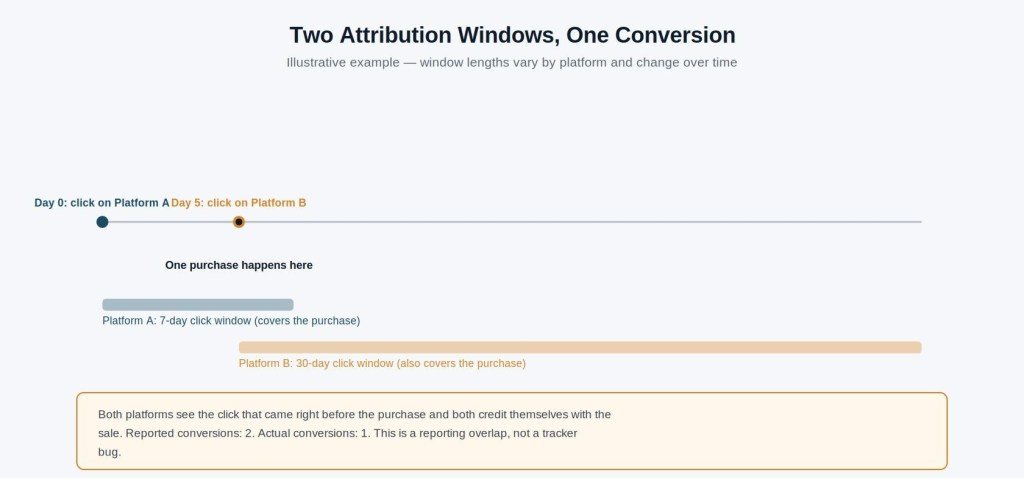
Both platforms can be technically correct about their own attribution rules and still add up to more sales than actually happened.
RedTrack’s documentation walks through this with a concrete, illustrative example: Meta’s default attribution window is a 1-day view and 7-day click, while Google Ads defaults to a 1-day view and 30-day click. If someone clicks a Meta ad today, doesn’t buy, then clicks a Google ad five days later and does buy, both platforms end up crediting themselves for that single sale — Meta because the purchase falls inside its 7-day window, Google because it falls inside its 30-day window. One sale, two platforms claiming it, and a tracker report that looks “wrong” to anyone comparing it against either platform alone.
How to check it: if the discrepancy is specifically between two ad platforms’ own dashboards (not between the network and the tracker), check each platform’s attribution window settings before assuming either number is broken.
How to fix it: there’s no fix that makes both platforms agree — different attribution logic is a design choice, not a bug. The practical move is to treat your tracker (assuming it’s configured correctly) as the source of truth for actual revenue, and treat each ad platform’s own reported conversions as that platform’s internal accounting, not ground truth.
10. No Click ID Was Available, and the Fallback Didn’t Catch It
What happens: the visitor converted through a path where no click ID could realistically be captured — a cross-device journey, a blocked cookie, an app install flow — and there was no fallback mechanism in place to catch it.
Why it happens: not every conversion path can carry a click ID cleanly. Voluum’s documentation on this exact scenario explains that when a cookie is blocked or lost, no conversion can normally be recorded at all — unless a fallback parameter (commonly a campaign ID) was included in the postback specifically to catch conversions that arrive without one. Without that fallback configured, these conversions simply don’t register anywhere in the tracker, even though the network processed them correctly on its end.
How to check it: this usually shows up as a pattern rather than a one-off — a specific traffic type (in-app, cross-device, certain browsers) consistently under-reporting relative to the network.
How to fix it: set up a fallback attribution parameter if your tracker and network both support one, understanding it will attribute to a campaign level rather than an individual click.
11. Reporting Delay or a Timezone Mismatch Made It Look Missing
What happens: the numbers genuinely don’t match today — and they genuinely will tomorrow.
Why it happens: two separate delay sources get blamed on “tracking problems” more often than anything else on this list. First, plain processing lag — Voluum’s own blog on common tracking issues notes that, by default, it reports conversions under the time of the original click, not the time the conversion actually happened, which can make same-day comparisons look inconsistent. Second, timezone settings: RedTrack lists “different time zones used” as one of the standard, fixable causes of conversion count mismatches between systems, since a conversion recorded at 11:50 PM in one timezone can land on a different calendar day in another.
How to check it: before troubleshooting anything else, re-pull both reports for a date range that’s at least 48 hours old and confirm both systems are set to the same timezone.
How to fix it: align timezone settings across tracker, network, and ad platform where possible. If a genuine processing delay is the cause, no fix is needed beyond understanding it as expected behavior.
12. The Payout Value Wasn’t Passed Correctly
What happens: the conversion itself is sitting right there in the tracker — clicks, status, timestamp, all correct — but the revenue is $0, or clearly wrong.
Why it happens: the conversion event and its payout value are two separate pieces of data inside the same postback, and it’s entirely possible for one to arrive correctly while the other doesn’t. Keitaro’s conversion-type documentation distinguishes between a Lead (payout not yet confirmed, shown under a “hold” metric) and a Sale (payout confirmed, shown as confirmed revenue) — a conversion sitting in Lead status with no dollar figure yet isn’t a tracking failure, it’s a payout that hasn’t been finalized. Separately, if the payout macro itself is missing or malformed in the postback URL, the conversion can register with a $0 value even after the network has actually confirmed and paid it.
How to check it: confirm whether the conversion’s status is one that’s supposed to carry a confirmed payout yet, before assuming the $0 is an error.
How to fix it: if the status genuinely warrants a payout and it’s still showing $0, check the payout/revenue macro in the postback URL against what the network is actually sending — this is a parameter-mapping issue, not a missing-conversion issue.
How to Debug a Missing Affiliate Conversion, Step by Step
Once you know which of the four “shapes” of missing conversion you’re dealing with, work through the chain in order rather than guessing at a cause. This is the same logic RedTrack, Voluum, and Keitaro all point to in their own troubleshooting material, just laid out as one sequence.

Follow the chain link by link rather than jumping straight to a settings change — each answer rules out an entire category of causes.
Step 1 — Confirm the click actually exists
Pull up the click in your tracker by timestamp, campaign, source, and GEO. If there’s no click at all, this was never a postback problem — it’s a traffic or click-logging issue, and none of the postback troubleshooting below applies.
Step 2 — Check the affiliate network’s own record
Log into the network directly and confirm the conversion exists on their side: status, timestamp, transaction ID, and the click ID or subid they have on file for it.
Step 3 — Check whether the network actually sent the postback
Some networks expose a sent-postback log; if yours does, check it. If not, this is where you’d contact the network’s support with the specific transaction ID and ask directly whether a postback fired.
Step 4 — Check your tracker’s received-postback log
This is the single most useful log in the entire chain, and the one most people check last instead of first. It tells you definitively whether the request ever arrived, and if it did, exactly what parameters it carried and why it was accepted or rejected.
Step 5 — Check attribution and matching
If the postback arrived, could the tracker actually match it to a click? Compare the subid in the postback against subids in your click log for that timeframe.
Step 6 — Compare timestamps and timezones
Re-check both systems’ timezone settings, and re-pull the comparison after enough time has passed to rule out plain processing delay.
Step 7 — Compare payout and revenue values separately from the conversion count
A conversion that exists with the wrong value is a different problem than a conversion that’s missing entirely — don’t let one mask the other.
Step 8 — Run a controlled test conversion
Where the network’s platform allows it (Voluum’s own testing guide describes exactly this method), fire a manual test postback using a real click ID copied from your tracker. This isolates whether the postback mechanism itself works, independent of anything happening on the network’s side.
Quick Diagnostic Reference
Use this as a starting point, not a diagnosis — it points you to where to look first, not a guaranteed cause.
| Symptom | First place to check | What to inspect |
| Clicks exist, zero conversions | Postback setup | Postback URL, postback log for invalid-request errors |
| Network has the conversion, tracker doesn’t | Postback delivery / matching | Sent-postback log (network side), received-postback log (tracker side), subid match |
| Tracker has the conversion, payout is $0 | Payout parameter | Payout/revenue macro, conversion status (pending vs confirmed) |
| A conversion appears to register twice | Duplicate handling | Duplicate-postback mode, protected postback settings, transaction ID |
| Numbers only differ for the last few hours | Reporting delay | Timestamps, timezone settings on both systems |
| Conversions vanish after a redirect or lander | Parameter passing | Redirect chain, macro names at each hop |
A Note on Trackers: Keitaro, Voluum, RedTrack, Binom
The troubleshooting logic above is the same regardless of which tracker you run — postback arrives, tracker matches it to a click, tracker validates the status, tracker records the conversion. What differs between Keitaro, Voluum, RedTrack, and Binom is where the relevant log lives, what the error messages are called, and which macro syntax the postback URL uses.
Keitaro logs postbacks under Maintenance → Logs → Postbacks and documents its macro system ({subid}, {status}, {sub_id_1} through {sub_id_30}) in detail, including a dedicated troubleshooting page for common postback errors. Voluum separates traffic-source postbacks from network postbacks — only one fires per conversion event — and surfaces failures in a dedicated Error Log with category-level detail. RedTrack publishes an unusually direct explanation of conversion inconsistencies, splitting causes into ones its support team can fix (wrong parameters, expired integrations, duplicate settings) and ones that are structural and can’t be “fixed” at all (different attribution windows, cross-device gaps). Binom and Affise commonly use a sub1–sub8 parameter convention alongside a dedicated click ID macro, and mismatches there tend to be template-copying errors between one integration and another.
None of this is a comparison of which tracker is “better” — that’s a separate question with its own dedicated article. It’s a map of where to go looking once you already know the category of problem you’re dealing with.
FAQ
What is an affiliate postback?
A server-to-server request an affiliate network (or advertiser) sends to your tracker to report that a conversion happened. It typically carries the click ID, a status, and a payout value.
Why are affiliate conversions not showing up in my tracker?
Most often because the postback never arrived (broken URL, wrong domain, authentication mismatch), the click ID it carried didn’t match a click on file, or the status parameter was missing or unrecognized. Work through the postback log first — it usually shows which of these it is.
Why does my CPA network show more conversions than my tracker?
This is rarely one single cause. Check for a broken or partially-copied postback URL, a subid that isn’t being passed through your full redirect chain, and duplicate-filtering settings that might be silently rejecting legitimate repeat postbacks.
How do I test an affiliate postback?
Copy a real, recent click ID from your tracker’s click log, paste it into your tracker’s postback URL template in place of the placeholder, and fire the request directly (in a browser address bar or with a tool like curl). Then confirm the test conversion appears correctly in your tracker.
Why is my click ID missing from a conversion?
Usually a redirect-chain problem — one hop between your tracking link and the final offer page used a different parameter name than the rest of the chain, and the value was dropped rather than passed forward.
Can redirects break affiliate tracking?
Yes. Every redirect in the chain between your tracking link and the offer is a place where a parameter can be renamed, dropped, or overwritten. This is one of the most common causes of a network showing a conversion your tracker never receives.
Why is the conversion tracked but the payout is missing?
The conversion event and its payout value are separate fields in the same postback. A conversion can register correctly while its payout macro is missing, malformed, or simply not yet confirmed (many networks hold payout until a lead becomes an approved sale).
How long should an affiliate postback take to appear?
This varies by network and by conversion type. A lead can postback almost instantly; a sale that requires payment settlement or fraud review can take hours to days. Before troubleshooting a delay, re-check the comparison after at least 24–48 hours.
Key Takeaways
- A missing conversion means a break somewhere in the network → postback → click ID → tracker → payout chain — start by working out where, not by assuming the tracker is wrong.
- The postback log (both the network’s sent-postback log and your tracker’s received-postback log) is the single most useful diagnostic tool, and the one most people check last.
- Different systems can legitimately disagree — attribution windows, cross-device gaps, and pending-vs-confirmed status aren’t tracking failures, they’re different systems counting by different rules.
- A conversion that exists with a $0 payout is a different problem than a conversion that’s missing entirely; don’t let a payout-parameter issue send you looking for a phantom tracking bug.
- The troubleshooting logic is the same across Keitaro, Voluum, RedTrack, and Binom — only the log locations and macro names change.



Leave a Reply